[ Pro Agents and Smart panes ]
Every coding agent, on every server,
in one list.
Vaulterm's Agents page finds the coding agents running in your terminals, on this computer or over SSH, and puts the ones waiting for you first. Start Claude Code, Codex or Gemini CLI where the code lives, and get a notification when it needs you.
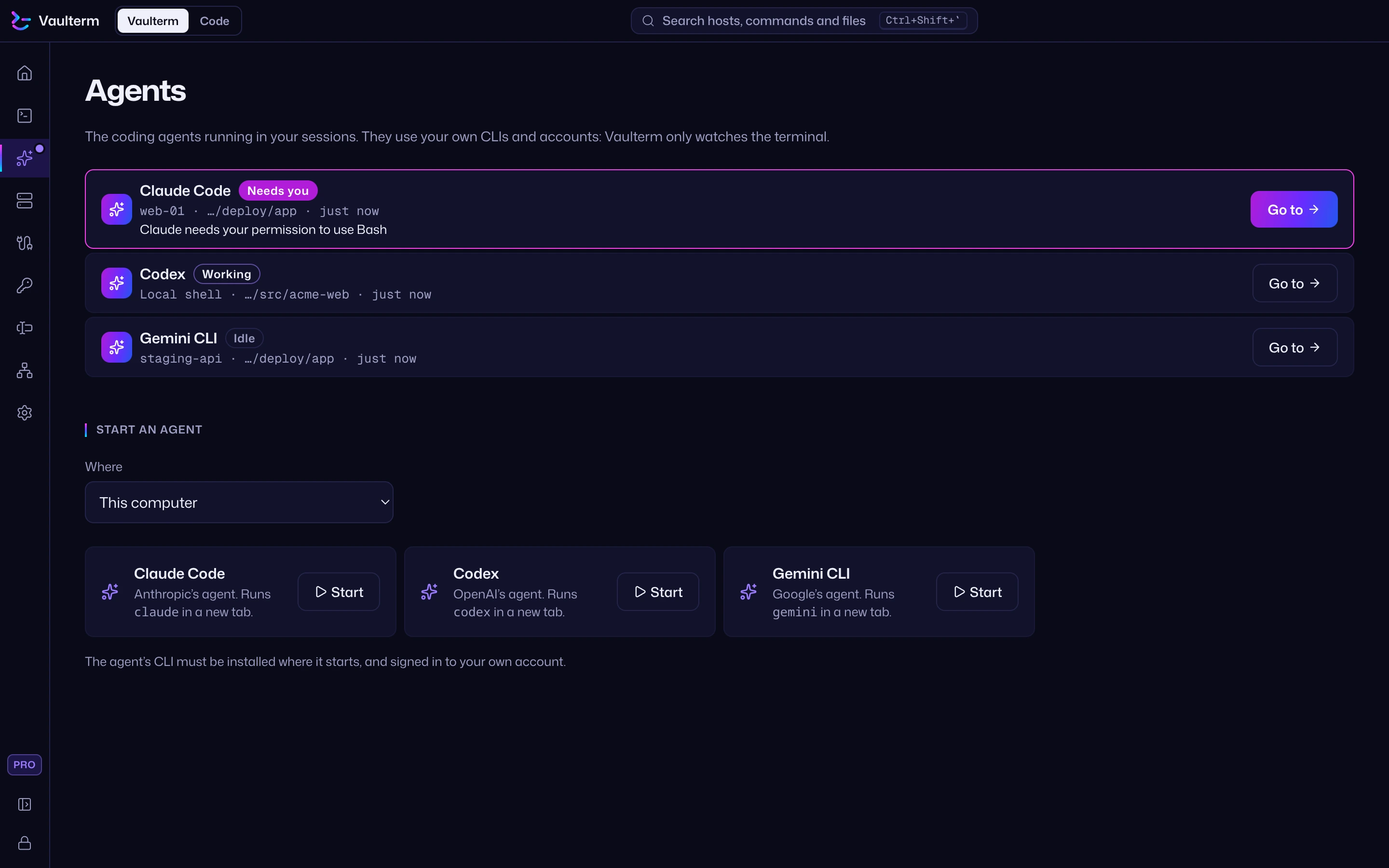
Start an agent in any pane, local or SSH, and it appears. Nothing to install on the server.
Each agent shows its state, where it runs, its folder and for how long. Go to jumps straight to its pane.
A pink badge on the tab, a count on Agents in the rail, and a desktop notification: "Claude Code needs you".
Pick This computer or a saved host, then Start Claude Code, Codex or Gemini CLI in a new pane there.
Every tab and pane header names what runs in it and whether it's working, so a busy tab of agents stays readable.
Agents use your own CLIs and subscriptions. The Agents view only tracks the CLIs you run. It sends nothing to any AI service.
Why run agents
in Vaulterm?
Coding agents work best on the machine with the code, which is often a server. Running several of them means a lot of tabs, and checking each one to see which has stopped to ask you something. Vaulterm watches every pane for you: agents waiting for you come first, and a notification takes you to the right pane.
It works over the same SSH connections as the rest of Vaulterm, with your saved hosts, keys and jump hosts. How to use Agents and Smart panes.
Prefer Claude inside the editor? Vaulterm Code's Claude panel (beta, Pro) runs on the server with your own API key. Claude in Vaulterm Code.
Claude Code on a remote server: tmux or Vaulterm
The common way to run Claude Code on a remote server is to connect with ssh and start it inside tmux, so it keeps running if the connection drops. That works with any SSH client.
Vaulterm adds a GUI over your SSH agent sessions: the Agents list shows every Claude Code, Codex and Gemini CLI session with the ones waiting for you first, Smart panes name what runs in each pane, and a notification takes you to the pane that needs you. You can also start an agent on a saved host from the Agents page. This needs Pro.
Vaulterm Code is an editor for the code those agents change, on this computer or a server.
Claude Code is a trademark of Anthropic. Vaulterm is not affiliated with or endorsed by Anthropic, OpenAI or Google.
Questions
Which coding agents does Vaulterm recognise?
Claude Code, Codex, Gemini CLI, Aider, OpenCode and Cursor Agent. Vaulterm can start Claude Code, Codex and Gemini CLI for you.
How does Vaulterm know an agent needs me?
From the agent's own window title, which shows a spinner while it works, and from the terminal bell. Nothing is installed on the server.
Do I need an AI subscription from Vaulterm?
No. Agents run with your own accounts, the same as in any terminal.
Is Agents free?
Agents and Smart panes are in Pro: $5 a month, $49 for 12 months or $349 for life. See Pricing.